



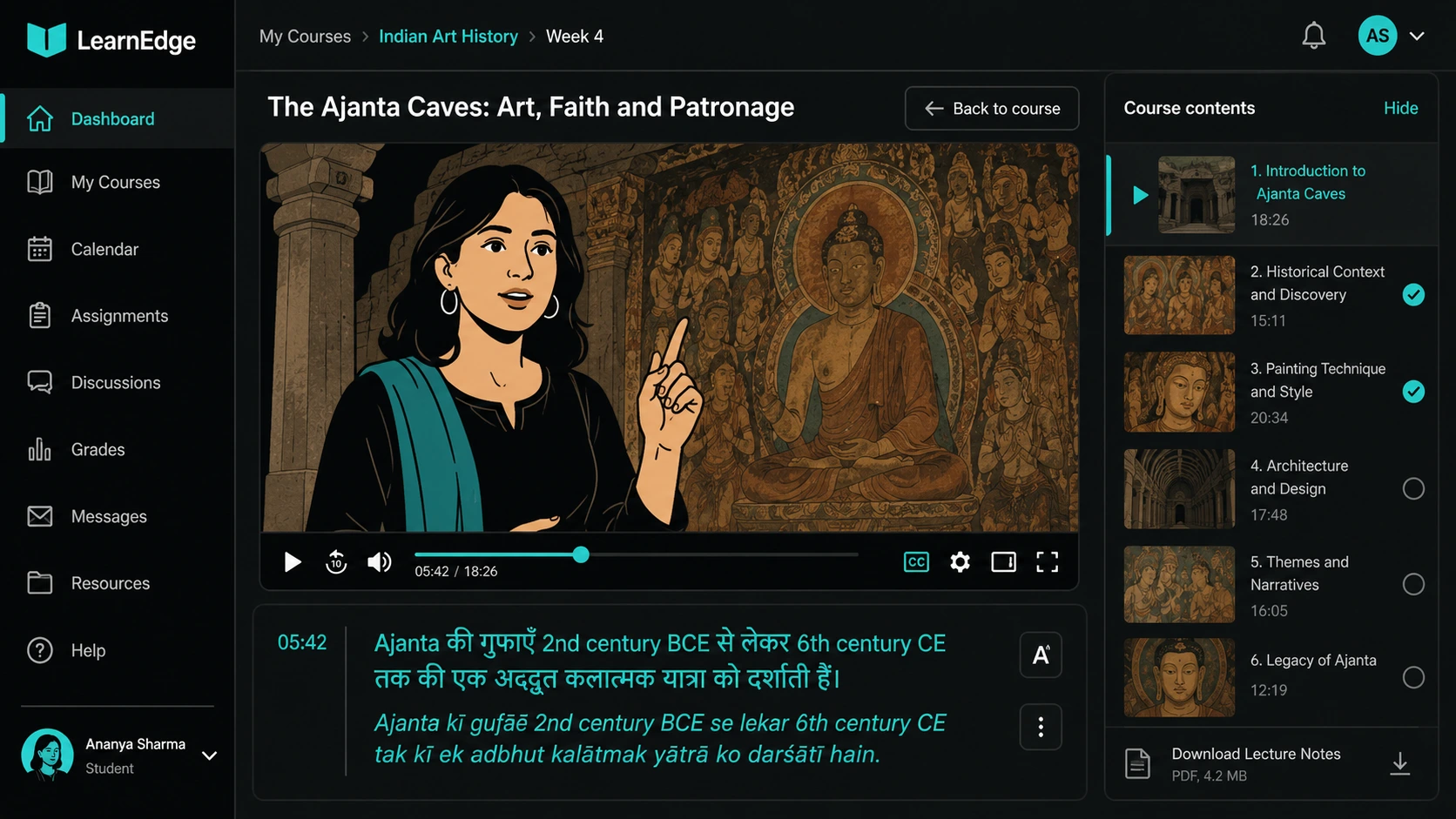
An EdTech content ops team sourcing a subtitle service has different requirements from a marketing team captioning social videos or an OTT platform releasing a film. The evaluation criteria that matter — LMS format compatibility, domain-specific vocabulary accuracy, lecture-style audio handling, and the ability to scale as a course library grows — rarely appear in general subtitle service rankings. This list scores on those criteria specifically.
A subtitle service for e-learning is a vendor or pipeline that produces timed text files compatible with LMS platforms and course delivery environments, with sufficient accuracy on educational and domain-specific vocabulary to support learner comprehension. It works by combining audio transcription, translation where required, timing calibration for lecture-paced speech, and format delivery in LMS-compatible outputs — most commonly SRT or WebVTT. It's most commonly evaluated by EdTech content ops leads, instructional designers, and L&D managers sourcing subtitle coverage for course libraries at scale.
What makes subtitle requirements different for e-learning
Four things distinguish e-learning subtitle requirements from general subtitle work, and a vendor who handles one well may handle the others poorly.
LMS format compatibility. Course content is delivered through LMS platforms — Moodle, Canvas, Blackboard, TalentLMS, Docebo, SAP Litmos, and many others. Each platform has specific requirements for subtitle file formats and how subtitle tracks are ingested. SRT is the most universally compatible format and works on nearly every LMS and video player. WebVTT is the native format for HTML5-based LMS environments and supports CSS styling, speaker identification tags, and position control that SRT cannot provide. SCORM and xAPI packages require subtitles to be embedded or sidecar-packaged within the content bundle. A subtitle vendor who delivers SRT only may not be sufficient for a platform requiring WebVTT positioning or SCORM-embedded captions.
Domain vocabulary accuracy. Lecture content covers technical terminology at a density that general-purpose AI transcription tools handle poorly. A medical education course contains clinical terminology. A finance course has SEBI, CAGR, and derivative vocabulary. A coding bootcamp has function names, syntax terms, and package names. When these terms are transcribed incorrectly — which AI models trained on general speech do regularly — the subtitle becomes actively misleading rather than just imperfect. In a learner assessment context, a wrong technical term in a subtitle is a different category of failure from a wrong word in a YouTube caption.
Lecture-style audio handling. Lecture recordings are different from scripted broadcast content. A subject-matter expert delivering a recorded lecture speaks at variable pace, uses technical vocabulary without repetition, references visual content on screen verbally, and may code-switch between English and Hindi or a regional language mid-sentence. Auto-generated captions calibrated for general conversational speech produce measurably higher error rates on lecture audio than on scripted content.
Scaling as the course library grows. A subtitling solution that handles 10 hours of course content a month may not handle 100 hours with the same quality and turnaround. For an EdTech platform growing its course library, the subtitle pipeline needs to scale without proportional quality degradation or cost escalation — which favours managed AI-native pipelines over per-project freelancer arrangements that require constant re-briefing.
The ranked options
1. ButterCut — best for Indic language accuracy at scale
For Indian EdTech platforms serving learners across Hindi, Tamil, Telugu, Bengali, and other Indic language markets, ButterCut's subtitle pipeline addresses the specific gap that most services leave: Indic language accuracy on educational content at the quality level learner comprehension actually requires. Generic AI transcription tools produce flattened, stilted output on Hindi lecture audio — particularly on code-switched content where a subject-matter expert mixes Hindi and English mid-sentence, which is normal for Indian instructors. The pipeline delivers SRT, WebVTT, and embedded formats compatible with standard LMS environments, and handles the volume throughput that growing course libraries require without per-project setup overhead. The trade-off is that it's a managed service rather than a self-serve dashboard, which adds a brief intake step for new content batches.
2. 3Play Media — best for accessibility compliance and multi-format delivery
3Play Media is the established enterprise choice for US and global EdTech platforms with formal accessibility compliance obligations — WCAG 2.2, ADA, Section 508. It integrates directly with major LMS platforms including Canvas, Brightcove, Kaltura, Panopto, and JWPlayer, and delivers captions to 99% accuracy with human review as standard rather than optional. The format range is comprehensive: SRT, WebVTT, SCC, DFXP/TTML, and SCORM-compatible delivery. For Indian EdTech platforms expanding internationally or managing US-market content with compliance obligations, 3Play Media's integration depth is genuinely differentiated. For India-first platforms focused on Indic language accuracy rather than US compliance frameworks, the per-minute cost and English-centric quality advantage are less relevant.
3. Rev — best for fast-turnaround English course content
Rev delivers captions at 99% accuracy with a human-in-the-loop process, integrates with YouTube, Vimeo, Kaltura, Panopto, and Zoom, and offers burned-in captions as an option for platforms that don't support separate subtitle tracks. Turnaround is typically 24 hours or less for standard content. Pricing is per-minute and competitive for English content. The limitation for Indian EdTech is the same as for most US-headquartered services: Hindi and Indic language support is available but not a design priority, and accuracy on Indian-accented English or code-switched lecture content degrades compared to its performance on native English speech.
4. HappyScribe — best self-serve option for multilingual course content
HappyScribe supports over 60 languages with AI transcription and human review as an add-on, with per-minute pricing that makes it accessible for smaller course libraries. The self-serve interface is straightforward: upload a file, select the language, and receive a draft for review and export. For an instructional designer managing occasional subtitle projects without dedicated ops support, HappyScribe's self-serve model reduces setup overhead compared to a managed service engagement. Quality on general English and common European languages is reliable; Indic language accuracy is inconsistent and requires more editing time than English-language content.
5. Quadrate — best India-based full-service option with LMS integration support
Quadrate is an India-based service offering SRT, VTT, TTML/DFXP, SCC, STL, and sidecar transcripts with specific support for LMS import across Moodle, Canvas, Blackboard, LearnDash, TalentLMS, Docebo, and custom platforms. For EdTech platforms needing managed LMS integration support alongside subtitle production — particularly where the LMS team and the content team don't have capacity to manage format testing themselves — the end-to-end integration support is a genuine differentiator. Turnaround ranges from 24-48 hours on express to 3-7 days standard.
Comparison table
| Service | Indic language depth | LMS format support | Domain vocabulary accuracy | Model | Best for |
|---|---|---|---|---|---|
| ButterCut | High — purpose-built for Hindi, Tamil, Telugu, Bengali, Marathi, Kannada, Malayalam | SRT, WebVTT, embedded — major LMS platforms | High on Indic content; native-speaker QA | Managed AI-native pipeline | Indian EdTech at volume with Indic language learner bases |
| 3Play Media | Low — US-market primary, English-first | Highest — direct integrations with 10+ LMS platforms | High on English technical content; 99% accuracy guarantee | Managed, human-in-the-loop | US or global EdTech with formal accessibility compliance obligations |
| Rev | Low — English-first | Good — YouTube, Vimeo, Kaltura, Panopto, Zoom integrations | High on English; degrades on Indian accents | Managed, 99% accuracy SLA | Fast-turnaround English course content at competitive per-minute rates |
| HappyScribe | Low to medium — 60+ languages, not Indic-specialist | SRT, WebVTT, SCC, DFXP — standard formats | Medium — AI with optional human review | Self-serve with human add-on | Multilingual course content at smaller volumes without managed service overhead |
| Quadrate | Medium — India-based, Indian English trained | High — LMS integration support included | Medium-high — AI + human, Indian English optimised | Managed, India-based | India-based full-service option with active LMS integration support |
Where each approach works and where it doesn't
Where managed subtitle services earn their cost in e-learning
- Course libraries scaling beyond 10-15 hours of new content a month, where per-project freelancer management becomes its own operational overhead
- Indic language learner bases where subtitle accuracy directly affects comprehension and assessment scores, not just accessibility compliance
- Multi-language course release for platforms distributing in Hindi, Tamil, Telugu, and other regional languages simultaneously
Where self-serve tools are sufficient
- Small course libraries with low subtitle volumes and in-house capacity to review and correct AI-generated drafts
- English-only content for international audiences where general AI transcription accuracy is sufficient without domain vocabulary customisation
- Platforms where subtitle quality is a secondary consideration behind production speed and cost
FAQ
What subtitle format does Moodle or TalentLMS require?
Both Moodle and TalentLMS support SRT and WebVTT as standard subtitle inputs. WebVTT is preferred for HTML5-based course players that need styling or speaker identification. SRT works on virtually every platform as a fallback. Confirm with your specific LMS version before commissioning subtitle production in a non-standard format.
How do subtitle services handle technical vocabulary in course content?
The best practice is to provide a glossary of domain-specific terms — product names, technical vocabulary, acronyms — before transcription begins. Vendors with a custom vocabulary briefing capability apply this to the AI transcription pass, reducing the error rate on specialist terms before human review. Vendors who don't offer this will produce higher error rates on domain vocabulary by default.
Can subtitles be embedded directly into a SCORM package?
Yes. SCORM is a content packaging standard, not a video format — subtitle files are embedded within the SCORM package alongside the video component. Most managed subtitle services with e-learning experience can deliver SCORM-compatible packages with subtitle tracks already embedded. Confirm this specifically before commissioning, since not every subtitle service includes SCORM packaging as standard.
How important is subtitle accuracy for learner assessment scores?
Meaningfully important, particularly for learners consuming content in a second language. A subtitle that misrepresents a technical term — a wrong drug name in a medical course, a misheard financial concept — doesn't just reduce comprehension; it actively produces incorrect knowledge that can affect assessment performance. The accuracy threshold for educational content is higher than for entertainment or social media captioning.
The best subtitle service for an EdTech or e-learning platform in India is the one that clears the four criteria that generic ranking lists don't test: LMS format compatibility, domain vocabulary accuracy, lecture-style audio handling, and Indic language accuracy for regional learner bases. Managed services with native-speaker QA and custom vocabulary briefing outperform generic AI tools on all four. For Indian EdTech platforms specifically, the Indic language accuracy gap between a purpose-built service and a Western-trained AI tool is wide enough to be a learner comprehension issue, not just a production quality one.
If your course library serves learners in Hindi, Tamil, Telugu, or other Indian languages and the subtitle quality is affecting comprehension rather than just access, ButterCut is built for exactly this use case. Book a free demo to compare output on your actual course content.
Sources
- Quadrate, Subtitles for E-Learning Videos India — LMS format list and SCORM/xAPI alignment
- Ekitai Solutions, Subtitling for E-Learning Courses — format types and TEP workflow for domain vocabulary
- Circle Translations, Best Subtitling Services for E-Learning Videos — $5-15/min pricing, SRT vs WebVTT guidance
- Rev, How to Caption and Subtitle Online Courses — LMS integration list
- CAMB.AI, SRT vs VTT vs SBV Subtitle Formats Explained