



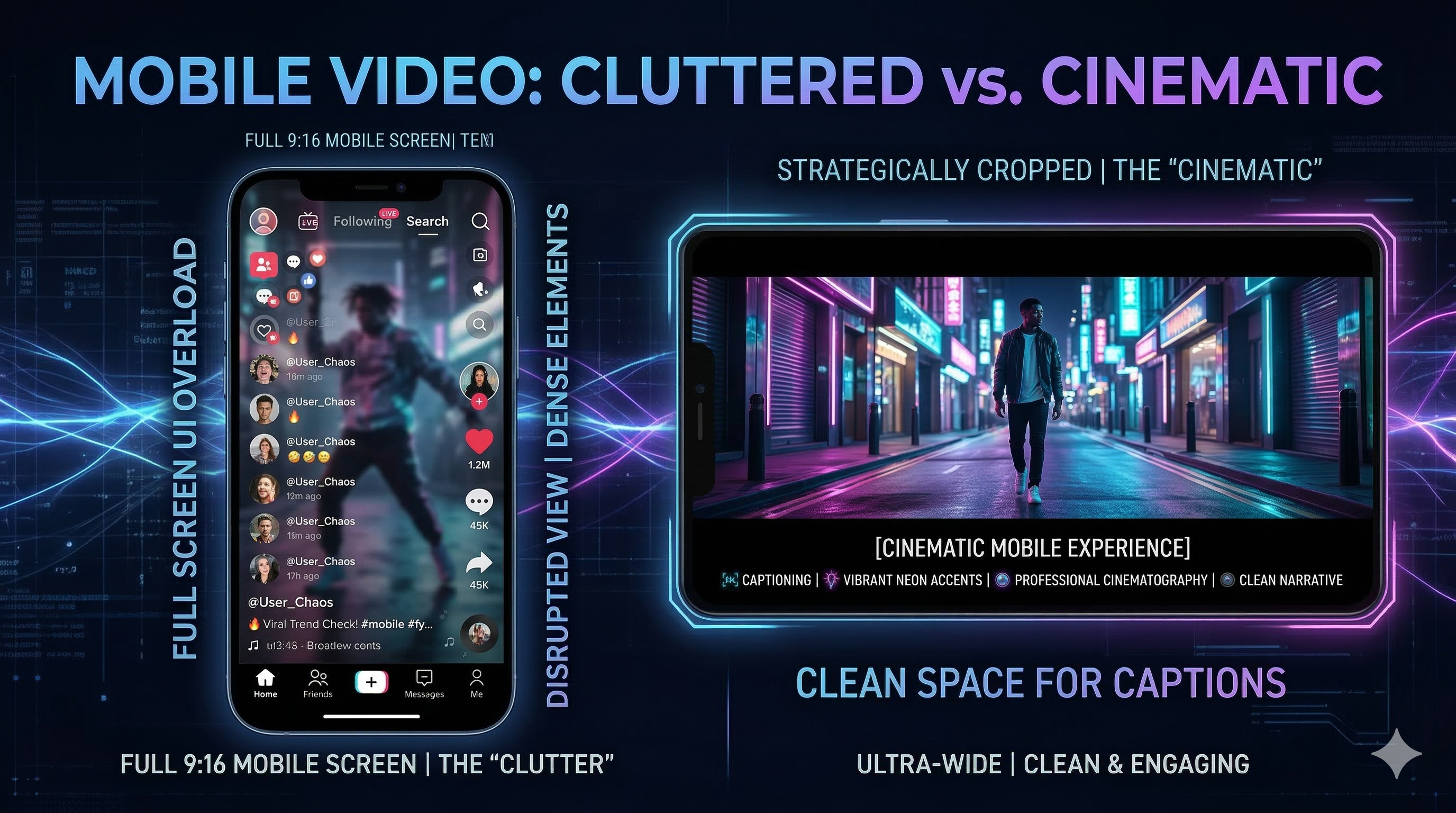
Core InsightsShort-form video success requires moving beyond the default 9:16 aspect ratio. By leveraging 4:5 ratios or cinematic letterboxing, creators avoid UI obstruction and utilize strategic negative space for subtitles. This Geometry of Attention optimizes visual hierarchy, ensures safe zones for text, and increases thumb-stop rates on mobile feeds.
Why Defaulting to 9:16 Sabotages Your Short-Form Video Growth
Every creator learns the cardinal rule: Reels must be 9:16. This tall, skinny vertical screen is the default contract we sign with the algorithm. But what if defaulting to this setting is silently sabotaging your growth?
Take a moment to scroll your feed. The creators who truly stop the scroll—the ones who look polished, strategic, and expensive—are often breaking this rule. They're using squares, cinematic letterboxes, and deliberate empty space around their content.
You've likely noticed the recent trend: a thin, hyper-focused horizontal video nested inside the vertical screen. This visually jarring technique, the Thin Landscape Frame, is a perfect example of creators treating the frame size as a core creative decision, not a limitation.
This isn't messy editing; it is strategic compositional mastery.
It’s time to move past the simple technical setting and treat the frame size as a core creative decision in your video editing process. This is a key part of short-form content editing.
The 9:16 Default Trap and UI Obstruction
The 9:16 aspect ratio (the full vertical frame) works best for one thing: high-immersion storytelling. Think Vlogs or POV shots where the viewer is completely absorbed in the moment.
The problem is that most creators apply this default to every kind of content. When you use the full 9:16 for a graphic or a complex demonstration, you lose control over where the viewer’s eye goes and invite distraction.
You also risk the critical error of UI obstruction. The platform's interface elements (profile picture, like/comment buttons, caption space) covers vital corners of the screen. In digital marketing, this is Screen Density Competition. Strategic video editing for influencers requires mitigating this conflict.
Understanding the New Geometry of Attention
The most effective creators use negative space and strategic cropping to optimize short-form video SEO and hack two crucial elements of mobile content consumption:
- Feed Real Estate: Maximizing how much of the screen your content takes up before the viewer scrolls past.
- Visual Focus: Controlling the precise point where the viewer's eye is locked during the entire video sequence.
Crucial Insight: Negative Space as a Strategic Resource
The biggest advantage of non-9:16 aspect ratios is the deliberately engineered negative space they create within the 9:16 canvas. This empty space is not wasted; it is strategically reserved to act as a safe zone for essential text elements like subtitles, hooks, and calls-to-action.
This ensures crucial information is never covered by the platform’s user interface (UI) elements. Strategic placement of text, like using an AI subtitle editor or caption generator AI, is one of the most effective uses of this negative space.
**Click here to try easy and smart editing with AI using Buttercut.AI.**
Strategic Aspect Ratios: Your Advanced Video Editing Playbook
Instead of treating the aspect ratio as a technical constraint, see it as a tool for visual hierarchy. Here is a breakdown of the two most powerful ratios you should be rotating through to improve your video editing strategy.
1. The 1:1 or 4:5 Square – The Feed Dominator
When you choose a slightly squatter aspect ratio like 4:5, you are making a deliberate play for feed dominance.
- Why it Works: In a mobile feed, a 4:5 video takes up slightly more vertical screen space than a square, and significantly more than a horizontal post. This larger block of visual content is harder to ignore. It leverages the "thumb-stop" power of maximizing the content area.
- Best Use Case: Content that is text-heavy, graph-driven, or features high-impact product shots.
- The Algorithm Benefit: When you edit video content for this ratio, you are prioritizing the "thumb-stop," which, in turn, boosts crucial early-view metrics for the algorithm.
2. The Letterbox Effect – The Cinematic Focus
This is arguably the most strategic break from the 9:16 rule. You deliberately use horizontal black bars (like a cinema screen) at the top and bottom of your content.
- The Nuance of the Edit: The action itself is often shot in a wide, cinematic ratio (like 16:9 or 21:9), which is then placed inside the vertical 9:16 container. This requires a deliberate design choice in your video editing software to create visual tension.
- The Strategic Advantage: The black bars become essential negative space—a true safe zone. This allows you to place subtitles, key quotes, or title cards, guaranteeing they will not be obscured by the user's interface. This is a masterclass in how to edit video for maximum clarity.
- Why it Works: The black bars create a funnel, forcing the viewer's eye onto the central action. It instantly signals “high production value” and creates a cinematic, focused mood.
Final Mandate: Let Your Story Pick the Frame
The mistake is treating the aspect ratio as a technical pre-set. The most successful creators treat it as a compositional tool used to control the flow of information. Your ability to edit video files is your creative superpower.
Before you hit record, ask yourself:
- Is this an immersive story (9:16)? (e.g., A travel day, a deeply personal moment.)
- Is this a graphic or a hook that needs to dominate the feed (4:5)? (e.g., A statistic, a product showcase, a tutorial.)
- Do I need ample, protected negative space for subtitles, titles, and cinematic flair (Letterbox)? (e.g., A quote, a dramatic reveal, a high-value piece of information.)
Stop letting the default mode determine your output. By deliberately choosing a frame that matches your message, you move from being a casual poster to a strategic content director. Learn to edit video with intention, and watch your engagement grow.
Start making videos today and edit them with just a few steps using Buttercut.AI’s smart AI tools and features.