



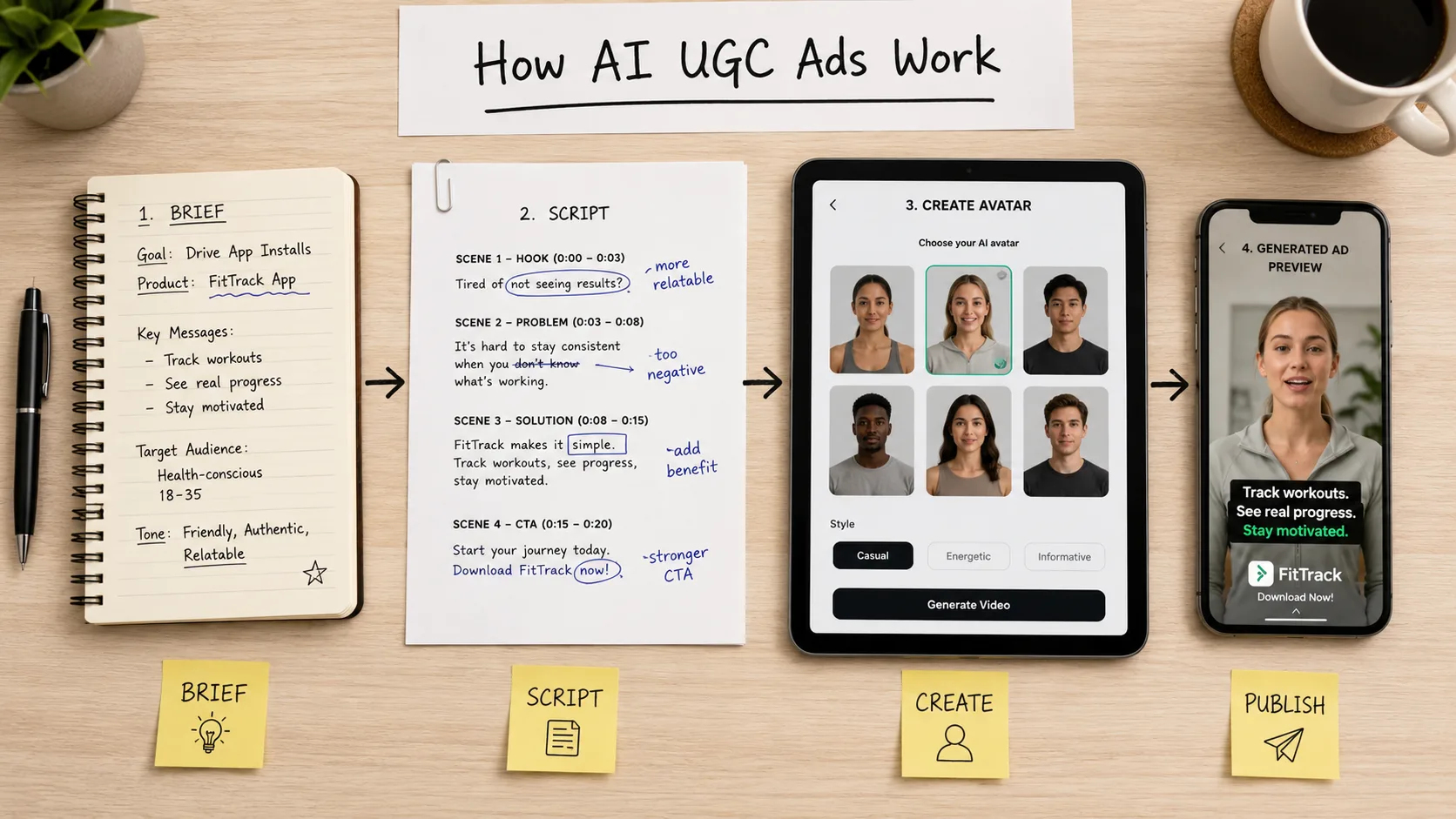
Most explanations of how AI UGC ads work make it sound like five clicks and a finished ad. The actual process has more steps, and more places it can go wrong, than tool marketing usually admits.
An AI UGC ad is produced by turning a creative brief into a spoken script, pairing that script with an AI character and voice, generating a synced video, and exporting it formatted for the specific platform placement it will run on. It works by combining language generation, voice synthesis, and video rendering into one pipeline. It is most commonly used to replace the multi-week cycle of briefing, filming, and editing a real creator for performance ad creative.
Here's what actually happens at each stage, and where the process tends to break down if it isn't built carefully.
Step 1: The brief
Every AI UGC video starts with the same inputs a real creator brief would need: the product, the audience, the core claim you want made, the tone, and the platform it's going to run on. Skipping this step and feeding a tool a bare product URL is the single biggest reason generic AI UGC output sounds generic. The brief is where the creative angle gets decided, not the generation step.
For Indian brands, the brief also needs to specify language and register upfront: pure Hindi, Hinglish, Tamil, or English with regional cultural references. This decision shapes the script, the character choice, and the voice model, so it has to happen before anything else.
Step 2: The script
This is where most of the actual creative judgment lives, and it's also where the process most commonly fails. A script written for reading looks nothing like a script written for speaking. Real testimonials have pauses, half-sentences, and a slightly imperfect rhythm. AI-generated scripts left unedited tend to sound complete and grammatically tidy, which is exactly what makes them read as fake.
A second failure mode specific to India: scripts translated from English into Hindi or another Indic language, rather than written natively for that language, almost always sound stilted. Code-switching, the natural mixing of English and Hindi mid-sentence that real Indian consumers actually speak in, is difficult for generic tools trained mostly on Western data to replicate convincingly. This is one of the areas where ButterCut is built specifically for Indic scripting rather than adapting a global template after the fact.
Step 3: Character and voice selection
The character isn't just a visual choice. Age, presentation style, and accent all affect how credible the claim feels to the specific audience watching. A skincare ad aimed at women in their twenties in Tier 1 metros needs a different presenter than a personal finance app targeting first-time earners in Tier 2 cities.
Voice matching matters as much as the visual. A character that looks Indian but speaks with American-accented text-to-speech under Hindi subtitles breaks the illusion within the first two seconds, and once a viewer clocks that something's off, the rest of the message gets discounted along with it.
Step 4: Generation
This is the part that's actually automated: syncing the script's audio to the character's lip movement and facial expression, then rendering a finished clip. The technical pipeline runs through language generation for the script, voice synthesis for the audio, and video generation for the visual, stitched together into one output.
Quality varies enormously between tools at this stage. Lip sync that's slightly off, robotic pacing, or unnatural blinking are the most common tells that immediately signal "AI" to a viewer, regardless of how good the script was.
Step 5: Platform formatting
A finished video still isn't ready to run until it's built to the exact specification of where it's going to appear. Meta's current placement structure essentially comes down to two ratios: 1:1 or 4:5 for Feed, and 9:16 for Stories and Reels. As of March 2026, Meta consolidated Facebook Reels, Facebook Stories, Instagram Reels, and Instagram Stories into a single unified 9:16 safe zone, meaning one correctly built vertical asset now covers all four placements without risking UI overlap.
This step gets skipped more often than it should. A square asset uploaded into a 9:16 slot gets auto-cropped by Meta and served anyway, but the crop reduces watch-through, and Meta's delivery system reads that drop as a creative quality signal, which can quietly push up your CPM on an otherwise good ad.
Where the self-serve model breaks down
Most AI UGC platforms stop at step 4 and hand you a raw export. You're left to handle formatting, caption styling, and platform-specific cropping yourself, on top of everything you already had to manage with scripts and avatar selection. For a brand testing two or three creative variants a month, that's manageable. For a brand that needs twenty variants a month across multiple languages to keep up with creative fatigue on Meta, doing all five steps manually every time becomes its own bottleneck.
This is the practical difference between a generic self-serve tool and a managed production pipeline. A pipeline that learns from what gets approved and what doesn't, and that handles platform formatting as part of the output rather than a separate task, removes a step rather than just speeding one up.
Where it works
- Brands that need the same core message tested across five or more script variants quickly
- Multi-language launches where filming separately for each language isn't realistic
- Teams that already have a clear creative angle and just need fast production turnaround
Where it doesn't
- Brands without a clear creative brief, since a vague input produces a vague script regardless of how good the generation step is
- One-off hero assets meant to anchor a brand campaign rather than feed performance testing
- Categories where a single off-tone word in the script could trigger platform or regulatory scrutiny, like health claims
Frequently asked questions
How long does it take to make an AI UGC ad?
Generation itself can take minutes once the script and character are set. The script and brief stage, done properly, usually takes longer than the actual rendering.
Can I edit the script after the video is generated?
Most platforms allow script edits before generation but require a re-render after, since the audio and lip sync are tied directly to the script text.
Do I need a different video for Reels and Feed?
Not anymore for Reels and Stories specifically, since Meta unified those into one 9:16 safe zone in March 2026. Feed still typically performs best at 1:1 or 4:5.
What makes an AI UGC video look fake?
Mismatched accent and visual presentation, robotic pacing, overly polished script language, and poor lip sync are the most common tells.
AI UGC ads are produced through five stages: brief, script, character and voice selection, generation, and platform formatting. The technology automates the generation stage, but script quality and platform formatting are where most output succeeds or fails, and both still require deliberate work rather than a single click. For Indian brands, native-language scripting and accent matching are the steps most generic global tools handle poorly.
If your team is manually reformatting AI-generated videos for every Meta placement every time you launch a new batch of creative, book a free demo with ButterCut to see a pipeline that handles scripting, character matching, and platform formatting as one workflow instead of five separate tasks.